
As of March 20 2015 WordPress accounted for 60.3% of all websites with a defined content management system (CMS) and an estimated 23.9% of ALL websites in the world (Per http://w3techs.com). That is quite an impressive number, but not surprising given how easy it is to create a site with WordPress and perform powerful functions such as running an ecommerce shop or managing events. However, this popularity comes at a cost: WordPress has become a very focused targets for hackers who want to exploit as many sites as possible. With this in mind every WordPress site administrator should always keep security in mind. For most people who are entrusting their livelihoods with WordPress, keeping up to date on the latest security issues and techniques can be confusing and time consuming. However, there is a great tool to help WordPress admins stay on top of their site’s security: Wordfence.
We have written about the basics of WordPress security in general before. Since then we have tried a few of the more popular WordPress security plugins available to help manage those and other tasks, but Wordfence has impressed us the most with its combination of flexibility, power, and scope. Best of all, there is a free version that will drastically improve the security on a WordPress site. We will look at a few areas in particular.
Strong Usernames and Passwords
By far the easiest way a hacker can gain access to a WordPress site is to simply go to http://yoursite.com/wp-login.php and use “admin” as the username and “123456” or “p@55w0rd” as the password, and then they are in. Any decent hacker will have access to a dictionary of the most commonly used passwords. By default WordPress will let you use anything as a password. It will provide feedback that the password is very weak, but it will still be usable. The typical user is in such a rush to get an account up and running they will disregard that warning to their own substantial risk. By using Wordfence there is an option to force all users to use strong passwords, and accounts cannot be created without a strong password. In addition, Wordfence can prevent users from registering with the username “admin”, by far the most commonly used (and exploited) username in existence.
In addition to forcing users to keep their passwords strong, Wordfence has a built in configurable firewall that can block users from repeated login attempts. By default, WordPress will allow an unlimited number of attempts to get into the site. Wordfence can be configured to block an IP address after a set number of attempts, thereby preventing “brute force” attempts. Similarly, it can be set up to automatically block IP addresses of those attempting to access the site via unused usernames. In the event that an IP is mistakenly blocked, it can be restored with a single click from the WordPress admin.
Scan the Site for Potential Security Risks
In addition to strong login credentials, the other great rule of thumb for keeping WordPress secure is to keep plugins and the WordPress core up to date. Thanks to automated security patches and simple, one-click plugin updates, this is usually quite manageable for most WordPress admins. However, Wordfence goes a step beyond simple automated messages to update plugins with a full system scan. This scan (which takes a matter of minutes) will not only check if plugin or theme is out of date, but it will also alert as to any serious vulnerabilities, such as a version of a plugin that has a known security flaw that must be updated immediately. This gives a sense of urgency to the standard WordPress update notifications.
Wordfence gives the user the option to scan non-WordPress files in the site installation. This is a huge improvement over the standard WordPress notifications that essentially ignore non-WordPress files. If the site is using some custom plugins that aren’t in the official WordPress repository (or perhaps some other CMS in conjunction with WordPress) the files will be scanned for known vulnerabilities in the WordFence database. Therefore, if the custom script has some security flaws an alert will be given so it can be patched. Without a system scan like Wordfence the site admin would never know until it was too late.
Real Time Statistics and Alerts
Wordfence has a very large number of statistics and reports at its disposal. The site admin’s email can quickly become inundated with site alerts, so it is a good idea to carefully choose which are the most relevant to the business at hand. For instance, alerts can be sent whenever a user logs in, which can be useful if the site is the sort that allows logins to very few individuals. Even more importantly, if you are the site admin and someone logs in with your account you will know that you need to take some immediate drastic measures! It can also send emails when a plugin on the site is deemed to have potential security vulnerabilities, or a plugin/theme simply needs to be updated.
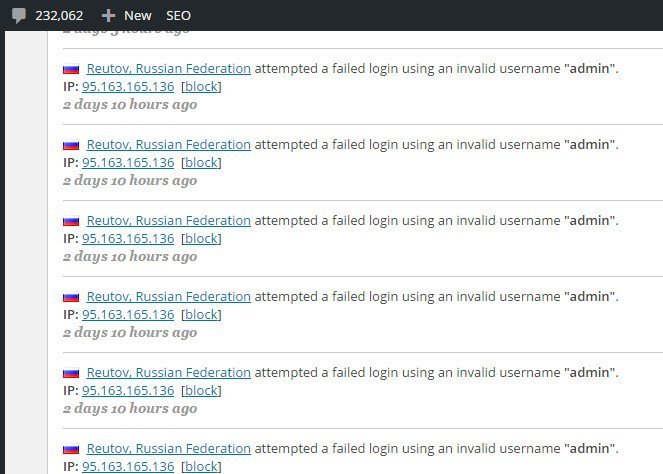
Another interesting feature is a real-time view of all visitors to the site. Unlike Google Analytics this tracks automated bots crawling the site for content, Google or otherwise. More importantly it shows all successful logins as well as failed login attempts. The screenshot below is taken from a site that does not have any users with the username “admin” and no site admins currently in Russia at the time of the attempt. When site admins view the number of people attempting to hack into their admin they undoubtedly take security more seriously.
Additional Features
Wordfence has the option to enable site caching in order to improve page load time. This is also highly configurable. It is definitely a feature to use with caution as not all plugins work well with third-party caching solutions. It is advisable to try out Wordfence caching on a development site before implementing on a production site.
All the above features are associated with the free version of Wordfence. The premium version (which uses an annual subscription fee) has a few extra features, most notably the ability to set up scheduled site scans and a two-factor authentication system that involves the use of a cell phone to sign in as an admin. We have found the free version to be sufficient in solving security issues and enforcing security policies, but those who have especially sensitive data or a large user base may want to consider investing in the premium version for added measure.
Ultimately, security is a multi-faceted endeavor that cannot be “fixed” through the use of a single plugin. With that said, Wordfence is one of the best tools out there to help put a site on the right path.










Comments are closed.