Learning to use the WordPress editor –

The WordPress editor is where most content is created on a page or post in WordPress. The tools of the WordPress editor assist in adding images, formatting text, and organizing your content. Knowing how to use the tools will allow you to think about your content more professionally, and provide more engaging content.
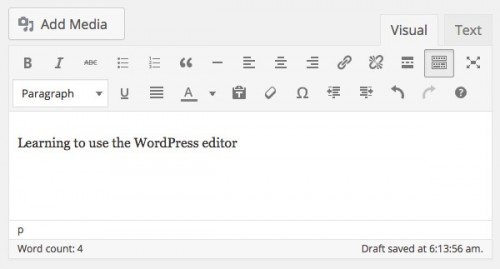
 Learning to use the WordPress editor

Toolbar Toggle for more tools

Look at all these additional tools! Using the Toolbar Toggle icon, you can expand an additional row of tools for the WordPress editor. This includes the ability to define text title tags, clear the formatting from your content, and so on. Don’t miss out on making the most of the WordPress editor, and be sure to have access to all the tools.

collapsed-menu

Becomes

expanded-menu

Visual to text tabs

You can switch between a visual editor and an html text editor by using the “Visual” and “Text” tabs in the top right of the WordPress editor. Switching to html can be helpful for adding shortcodes, or cleaning up strange formatting left from building the content (often present when pasting from Microsoft Word). But be careful! The text editor is sensitive to changes. Avoid altering the code in this area if you are not confident with your actions.

visual-and-text-tabs

Skills to master

There are a few skills which are essential to learn, and that you will use all the time when creating content.

Link to pages

Setting up links in your content assists users navigate your website, and provides useful data for search engines. Make your site more engaging by linking keywords to relevant content.

Add a link by clicking the chain icon from the toolbar. A popup will appear, where you can provide the link information. Select an existing page from your website, or provide the URL to an external website.

Inserting images

Images can be added to any section of your content. Align images to the left, right, or center of the text.

add-media

Insert an image by clicking the Add Media button above the toolbar, to the top left. A popup will appear, where you can select an existing image, or upload a new one. Once you select an image, you can define the alignment, link URL, and other important image settings from the right side. Insert the image, and your image will be applied to the page.

Setup titles

Setting up titles correctly is essential for the organization of your content. Providing order to the content makes it easier to navigate, and it just looks better.

text-formatting

The text formatting tool is only accessible when you expand the toolbar. Using the Toolbar Toggle icon, expand the toolbar to reveal the text formatting tool dropdown. Highlight the text you would like to change, and update the text formatting.

Pro tip: Don’t change the styles

When it comes to styling text, some people try to use the tools provided in the WordPress editor. Although this might seem like the right choice, it is the wrong solution to text styles. Changing styles directly in the WordPress editor makes your website elements inconsistent, and hard to manage. Every page starts looking different from the rest, and constructing content takes more effort.

Instead, leave the styles in the stylesheets, and select a defined text format from the text formatting tool. Don’t change fonts, or colors from the WordPress editor. Those changes should be made in the stylesheet, which will be applied to all texts of that type. This way, a paragraph is already styled like a paragraph, and a title is already styled like a title. No additional styling is required if your stylesheets are properly set up. This will save you time and mental frustration. If you need assistance updating your stylesheets, let us know.


Work With Us

We've been building websites for over twenty years, and have learned a thing or two about how to make web projects go smoothly.

What Our Clients Say

Watermelon Web Works, LLC place picture
4.7
Based on 19 reviews
powered by Google
OMS Anita profile picture
OMS Anita
22:20 29 Nov 24
Watermelon Web Works has been incredible to work with. They are patient, understanding, and quick to answer any questions (or emergencies) you might have. After switching over to them to help re-vamp our online retail store, we hired them to build our wholesale website as well. I can't recommend them enough - Thank you team!
Garrett Lister profile picture
Garrett Lister
19:55 10 Jul 24
Jared and the watermelon team were great - they quickly interpreted our website needs and designed a wonderful site. The project management site worked great to keep track of project.
N B profile picture
N B
21:23 14 Nov 23
My previous web developer who I was very happy with retired and I was pretty sad about it because it seems now days it is hard to hire a web developer close by with a good set of skills who is interested in helping small business at reasonable prices. Then I found Watermelon and I have been very happy. They are responsive, are able to solve problems, and work at reasonable prices.
Dark Star Magick profile picture
Dark Star Magick
18:05 03 May 23
We hired Watermelon to help us with our website. They were very thorough and took the time to explain in layman's terms what they were doing and how we could improve SEO and site functionality. We will definitely be back for future website needs!
Astoria Column profile picture
Astoria Column
18:42 24 Apr 23
Great work and amazing service! We're a non-profit, and our priorities are always focused on maintaining the Astoria Column. We had a website built by someone else a few years ago, but without regular updating and maintenance, sections of our site were no longer functional. Joanna and the rest of the team came in and had everything working within a week and it's been smooth sailing since then!
Ben Harris profile picture
Ben Harris
19:25 26 Aug 19
Watermelon has been a fantastic web development partner. Through every phase of our project they have always been 100% responsive to our requests and have always provided highly knowledgeable, creative, prompt, and personable team members to work with. As a financial institution we’re always concerned about the security and maintenance or our website and Watermelon has always provided the appropriate resources in order to meet and/or exceed our compliance and security requirements. We would surely refer them to any business associates looking for a qualified WordPress web designer in the future. – Denali Federal Credit Union
Mohr IP Law Attorneys profile picture
Mohr IP Law Attorneys
00:33 11 Apr 19
Watermelon Web Works did a great job creating a custom shopping cart page for our firm. Gavynn in particular was especially helpful and responsive. We appreciated the upfront costs and the technical competency of Watermelon Web Works and would not hesitate to work with the people there again.
Kim Markle profile picture
Kim Markle
23:36 08 Feb 19
Our company has been working with the Watermelon team for more than 10 years to help build and grow our website and customer portal. They are not only extremely talented and responsive, but are continuously looking for ways for us to enhance our current website. They are consistent, provide excellent customer service and really know what they are doing. Highly recommend!
Rick Brodner profile picture
Rick Brodner
23:23 12 May 17
I cannot say enough good things about Watermelon. They are terrific communicators, highly competent coders, and really, really nice people. They were instrumental in helping us to assemble a very usable, easily maintainable website for our organization. They' have demonstrated great flexibility in accommodating our evolving needs. They have been highly responsive to any technical issues, typically resolving them in less than 4 hours. Watermelon Web Works will make your organization better, and your CFO/Treasurer will be happy when they see the bill - what more can you ask for?
CLOSE








