WordPress Menus: An Introduction to the Basics

Many of our clients prefer a ‘hands-off’ approach to their websites and let us handle even small content updates, which we are always happy to do.  However, we encourage our clients to take advantage of the easy to use WordPress admin interface to manage their own content.  Creating and editing pages, posts, and media items is very easy to do, but often venturing beyond the basics can be intimidating for a first time user.  Though there are certainly areas of the admin that we advise you to leave to your development team (site settings, plugin adding/updating, permalinks, etc.), there are some components of your website that are just as easy to manage as pages and posts once you know your way around.  Creating and configuring your site’s menu navigation is one such example.

A Quick Tour of the WordPress Menu Admin

The admin area for everything menus is found under ‘Appearance’.
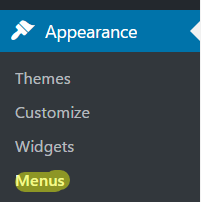
menu admin WordPress

You’ll see two tabs in the menu section, ‘Edit Menus’, and ‘Manage Locations’.  If you are just getting started, the first thing you’ll need to do is click the ‘create a new menu’ link.  Simply give your menu a name, and click ‘Create Menu’.  You’ll then be able to see that menu, as well as any previously created menus on the ‘Select a menu to edit’ dropdown select box.
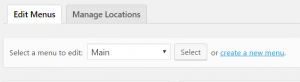
WordPress menus tabs

Once you select the menu to edit, the process for arranging the menu items hierarchy couldn’t be more intuitive.  You can simply drag and drop items to set the page order, and to create sub-menu items, simply drag the page to be indented to the item above it.  This will automatically make that item a child navigation item to the page above.  You can continue to indent menu items as far as you’d like to create multiple levels of sub navigation.  Just be sure to consider usability for your website users, as too many navigation items and levels can lead to frustration and ultimately the user giving up on finding what they came to the site for in the first place.  You can also change the navigation label for any menu item simply by clicking on the arrow for that item and entering a custom value.
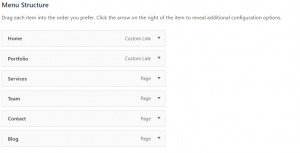
WordPress Menu Structure

To add new items to the menu, use the options on the left.  You can view pages, posts, as well as custom post types such as testimonials, staff, etc.  There are three options to help you find the content you are looking for, ‘most recent’, ‘view all’, and ‘search’ which are all fairly self explanatory.  If you’d like to add a menu link that is external to your website, you can use the ‘custom link’ option.  Just add the url and the link title.  For each item you’d like to add, check the box and click ‘Add to Menu’ then it will appear at the bottom of your list of drag and drop links.
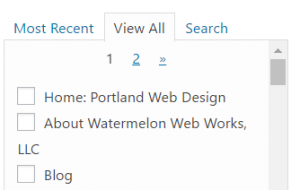
WordPress Menu Pages

An important thing to remember is that in order to save any changes you’ve made to your menu, you need to click the ‘Save Menu’ button.

Once you have your menus created, you need to assign them to the correct location based upon your theme settings.  Depending on your theme, you will usually have a main navigation, typically at the top of your site, along with any number of additional menu locations, such as the footer, sidebar, quick links, etc.  Simply choose the menu for each section from the drop down list that you’d like to use and click ‘Save Changes’.  If you aren’t sure which location is which, or you’d like to add a new location, be sure to contact your development team.
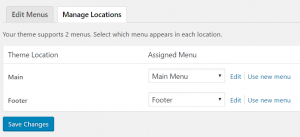
WordPress menu manage locations

The final item to be aware of is the ‘screen options’ toggle at the top right of the page.  As with any section in the WordPress admin, you can click on that to open up some more advanced configuration options for your site, such as additional content types, choosing if the menu link opens in a different window, and adding meta data to the links.

As with everything WordPress, there a number of different plugin and theme options which can expand your menu capabilities even further, but the overview above should get you started and give you the confidence to take on most any menu configuration change you’re looking to implement.


Work With Us

We've been building websites for over twenty years, and have learned a thing or two about how to make web projects go smoothly.

What Our Clients Say

Watermelon Web Works, LLC place picture
4.7
Based on 19 reviews
powered by Google
OMS Anita profile picture
OMS Anita
22:20 29 Nov 24
Watermelon Web Works has been incredible to work with. They are patient, understanding, and quick to answer any questions (or emergencies) you might have. After switching over to them to help re-vamp our online retail store, we hired them to build our wholesale website as well. I can't recommend them enough - Thank you team!
Garrett Lister profile picture
Garrett Lister
19:55 10 Jul 24
Jared and the watermelon team were great - they quickly interpreted our website needs and designed a wonderful site. The project management site worked great to keep track of project.
N B profile picture
N B
21:23 14 Nov 23
My previous web developer who I was very happy with retired and I was pretty sad about it because it seems now days it is hard to hire a web developer close by with a good set of skills who is interested in helping small business at reasonable prices. Then I found Watermelon and I have been very happy. They are responsive, are able to solve problems, and work at reasonable prices.
Dark Star Magick profile picture
Dark Star Magick
18:05 03 May 23
We hired Watermelon to help us with our website. They were very thorough and took the time to explain in layman's terms what they were doing and how we could improve SEO and site functionality. We will definitely be back for future website needs!
Astoria Column profile picture
Astoria Column
18:42 24 Apr 23
Great work and amazing service! We're a non-profit, and our priorities are always focused on maintaining the Astoria Column. We had a website built by someone else a few years ago, but without regular updating and maintenance, sections of our site were no longer functional. Joanna and the rest of the team came in and had everything working within a week and it's been smooth sailing since then!
Ben Harris profile picture
Ben Harris
19:25 26 Aug 19
Watermelon has been a fantastic web development partner. Through every phase of our project they have always been 100% responsive to our requests and have always provided highly knowledgeable, creative, prompt, and personable team members to work with. As a financial institution we’re always concerned about the security and maintenance or our website and Watermelon has always provided the appropriate resources in order to meet and/or exceed our compliance and security requirements. We would surely refer them to any business associates looking for a qualified WordPress web designer in the future. – Denali Federal Credit Union
Mohr IP Law Attorneys profile picture
Mohr IP Law Attorneys
00:33 11 Apr 19
Watermelon Web Works did a great job creating a custom shopping cart page for our firm. Gavynn in particular was especially helpful and responsive. We appreciated the upfront costs and the technical competency of Watermelon Web Works and would not hesitate to work with the people there again.
Kim Markle profile picture
Kim Markle
23:36 08 Feb 19
Our company has been working with the Watermelon team for more than 10 years to help build and grow our website and customer portal. They are not only extremely talented and responsive, but are continuously looking for ways for us to enhance our current website. They are consistent, provide excellent customer service and really know what they are doing. Highly recommend!
Rick Brodner profile picture
Rick Brodner
23:23 12 May 17
I cannot say enough good things about Watermelon. They are terrific communicators, highly competent coders, and really, really nice people. They were instrumental in helping us to assemble a very usable, easily maintainable website for our organization. They' have demonstrated great flexibility in accommodating our evolving needs. They have been highly responsive to any technical issues, typically resolving them in less than 4 hours. Watermelon Web Works will make your organization better, and your CFO/Treasurer will be happy when they see the bill - what more can you ask for?
CLOSE







