
MailChimp, one of the most popular and reliable email service providers, offers versatility and a wide range of useful features while still being fun and easy to use. Often, our clients here at Watermelon Web Works want to increase their market reach along with maintaining a consistent web presence. With MailChimp, it is easy to not only share content across a variety of social networks but also reach a broader audience with ease. Almost any small business website builder will agree that MailChimp is a great way to keep your clients/users returning to your website since most users will visit a site and not come back.
MailChimp offers many features that will benefit your website. It is free if you have fewer than 2000 subscribers. Not only is it easily customizable, but it is also responsive and will work on a majority of email readers/devices. Mobile devices such as smartphones and tablets are rapidly becoming the main way that people view web content; over 50% of emails are now opened up using mobile devices. MailChimp also offers a great analytics dashboard complete with actionable statistics and useful insights. Ever wonder how many people open your email? Ever wonder how many people click through the links to your carefully designed landing pages? With MailChimp, you can know this and more! Built-in A/B testing lets you experiment with how you interact with your customers and refine your approach with statistics to back up crucial business decisions. MailChimp also integrates very nicely with Google Analytics, giving you a whole suite of analytics info about customer behavior, campaign conversion rates, traffic patterns, and so much more.
MailChimp excels as an email list management tool. You can divide your lists up in order to tailor your newsletters across various groups. You can target particular groups of subscribers with a customizable newsletter that fits their interests and needs. For example, if you have a recipe website, you can send out a newsletter that has gluten free recipes to your clients that are gluten-free, or you can send out a newsletter that targets customers that are vegan, etc. You can also connect your e-commerce store to create targeted campaigns with MailChimp’s e-commerce integration. The possibilities are endless, and MailChimp makes it easy for you. Plus, it gives subscribers a personalized feeling.
Setting Up MailChimp
To start, you are going to want to download MailChimp here. Alternatively, you can install it through the backend (make sure to activate in both cases).
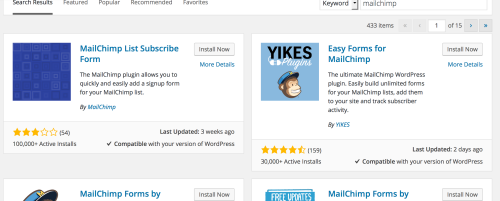
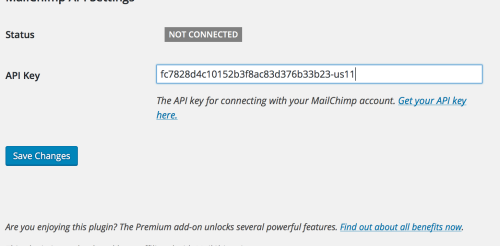
Once the plugin has been installed, you will have to connect it to your account. Signing up is easy. You will also have to add your API key to the plugin by going into MailChimp’s backend to Account>Extras>API keys and clicking down; your API key should pop up.

Adding the key to your WordPress site is pretty easy, you are going to want to go to the settings of your plugin and add your API key
By now, you should be set up with MailChimp on WordPress. The next step includes setting up your signup forms. You can pick different designs and formats that suit your design aesthetic. Also, you can customize your form further by adding fields that are relevant to your needs.
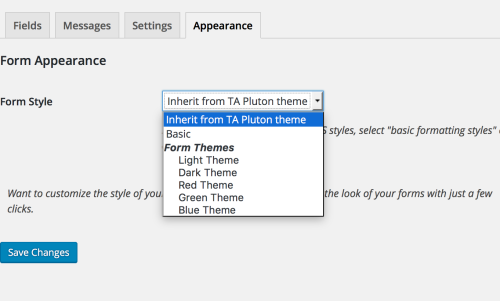
MailChimp integrates well with WordPress and adding the form to your website is pretty easy to do. It can be added to your preferred location with the shortcode or inserting the form through a widget.
Creating Newsletters
Creating a newsletter is easy. First, you will want to select the type of newsletter that you wish to send out and to which list you will be sending out your newsletter.
You will select the template of your email; select the one that fits what you want. You can drag and drop your content into the templates and fine-tune it to fit your needs. You do not need to have any knowledge of coding to create a newsletter template, which is great.
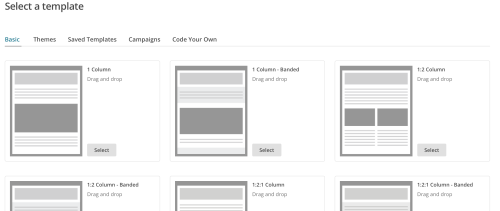
Adding your own content is easy: simply click on the area to which you wish to add your content and upload an image or add your text to that field. You can add new sections and content to your newsletter by clicking and dragging the items on the right. You can move the items around as you see fit.
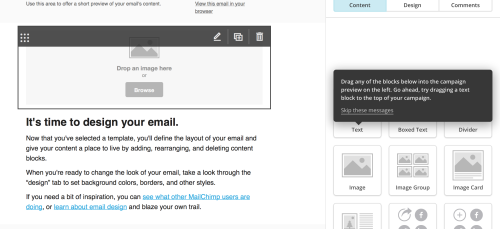
You can customize your newsletter even more by selecting the design tab, where you can change the colors, fonts, and more.
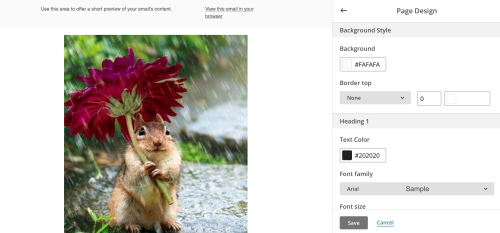
One of the features of MailChimp that makes it nice is that you can see your changes as you make them, and before you send it out, you can preview your newsletter.
Setting Up an RSS Feed
One of the easiest ways to send out newsletters is to create “RSS-driven campaigns” that will send out your latest posts to your users. These emails will only be sent if you post a new blog post. You can also send out your RSS feed newsletters manually, but automation frees up your time and makes your life easier.
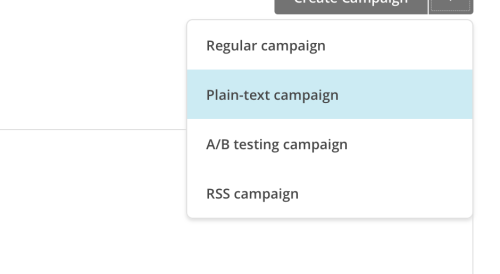
Setting up your RSS feed is simple. You will need to log in and go to Campaigns>Create Campaign. You should see a campaign dropdown that will allow you to choose what kind of campaign you want to send out.
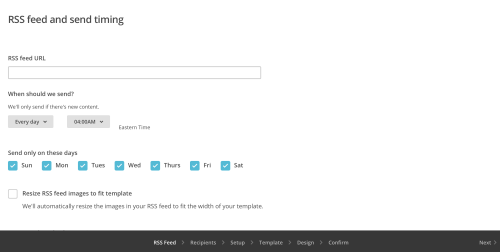
Add your RSS feed URL and specify what times you want to send out your automated emails (monthly, daily, etc.). Select the list that you wish to target, click continue, and specify a name for your campaign. MailChimp will fill most of the fields out for you, but you can customize them to fit your needs. Click “next” and continue.
Social Share
One feature of MailChimp that will improve your web presence is that you can share it with your social networks. To do this, you are going to want to connect it to your social networks (Twitter, Facebook), and this will automatically post your campaigns to those networks. Also, you can place social buttons, such as Tweet and Like, that will propel your readers to share your latest campaign.
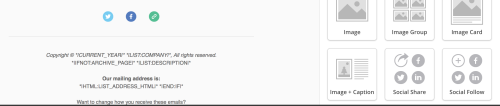
You can also use the sharing merge tags that can be customized to include the networks that you want to target. For example, the Google +1 tag allows readers to share your newsletter among their Google+ circles. You can also reach a greater customer base by adding sign-up forms on your social networks such as Twitter or Facebook.
Social sharing will not only allow you to reach new customers, but you can also track how many users are tweeting or liking your emails, which will allow for you to improve your newsletter. But, also by tracking which social networks receive the most social activity allows for you to see what works and what does not work. It will give your users a greater feeling of personalization with your business as well, and it will allow your content to reach a broader audience.
MailChimp is a valuable tool, and not only for you but your customers as well. It is easy to use, which is great, but it also will help you grow your website presence. MailChimp is constantly improving features and adding new ones that make life a bit easier. Setting up newsletters has become easier than ever with a couple of clicks of the button.









