
One of the biggest reasons we recommend WordPress as the go-to content management system (CMS) for our clients, is that it’s easy to manage your own content. We want to put as much power in the hands of our customers as possible to not only create and edit content, but also to control the layout and presentation of their website. This is where drag and drop visual content editors can come in handy.
Of course WordPress comes with its own visual editor out of the box, but the capabilities to change the layout and insert enhanced content elements (say an image slider, video section, or tabbed sections) is limited, and there is none of the drag and drop interface that has made services such as Wix and Squarespace popular among the DIY crowd. As with most things WordPress, the sky is the limit in terms of enhanced content elements when utilizing the virtually endless library of available WordPress plugins, but implementation often requires the use of a short code which, though a very simplified version, is as the name implies, ultimately ‘code’. As developers, we’re in this business because we love to code, but we recognize that even the ‘short’ variety of code can be a 4-letter word for our clients. Luckily, there are a number of excellent WordPress page builder frameworks that allow you to switch from the default WordPress editor to a flexible, powerful, and intuitive drag and drop style interface with just as many or more features as any of the non-WordPress based paid software platforms, while still allowing for the customizabilty, expandability, and portability that has made WordPress the CMS of choice for 60% of all websites, and 30% of all sites using a CMS (the closest competitor, Joomla, accounts for 6% and 3% respectively, for reference).
There are a myriad of options available for WordPress page builders, from stand alone plugins, to theme frameworks, and a detailed compare and contrast of each is beyond the scope of this particular post, but most have some common features including:
- Drag and drop capability: Being able to click and hold a modular content block and drag and drop it in place to change the order of things is really helpful and can save a lot of time and headache when working on a page with complex layout details.
- Layout elements: One of the most frustrating seemingly simple tasks for content editors is to layout content into columns of specific width ratios. Using WordPress out of the box, this requires custom templating or code markup within the editor itself, both of which require working with your development team. Page builders make this very easy, and automatically responsive to all devices, allowing you to choose an endless combination of column layouts and widths using a simple drag and drop content element picker.

- Enhanced content elements: Video boxes, flexible image galleries, tabbed content, accordion sections, headings, contact forms, widget areas, maps, social sharing buttons, and countless more, it couldn’t be easier to add whatever type of content you’d like with simple drag and drop fully configurable elements.
- Templating: On larger websites this can be a real game changer, and speed up content population significantly. Once you establish a page layout that you’ll use multiple times, you can save this as a template, and simply load it on the next page, changing the specific content as needed.
- Front end editor: Though not common to all page builders, many offer the ability to edit your website pages from the front end, meaning you can view the page your are working on in real time, and quickly preview changes before saving.
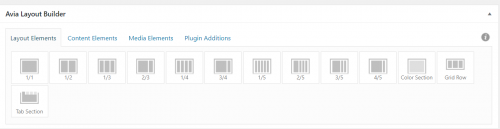
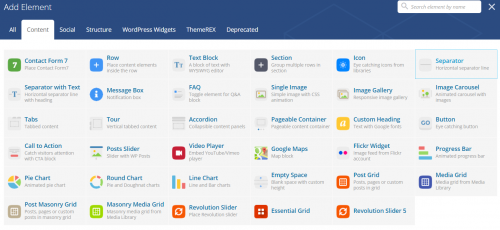
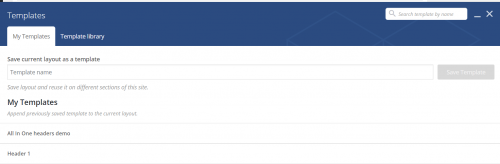
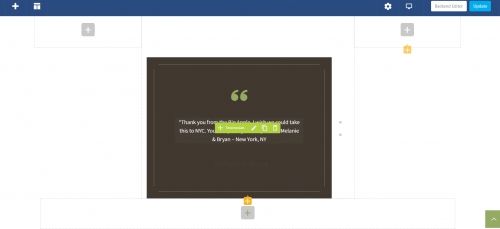
With all the above amazing features, you may be wondering why you wouldn’t use a page builder for every website project? Though every year since the first WordPress page builder, Visual Composer was released in 2011, more and more options have become available and as such the overall quality of the product offerings has improved, there are still some potential drawbacks to be aware of.
- Over complication: Though there is usually no coding required to work with page builders, there are a lot of options and settings, and this can often be overwhelming for a first time user, creating the potential to do more damage than good for novices working on their own content. Depending on the user, oftentimes less is more in terms of tools to create and manage content, and the flexibility that page builders offer can sometimes result in inconsistent and sloppy visual presentation from page to page versus more traditional methods of managing layout universally through the site’s theme files and custom fields.
- Page speed and SEO issues: Page builders by their nature add extra code markup behind the scenes, and this can potentially slow down the loading time of the page, and also create less than ideal markup for SEO purposes.
- Lack of flexibility: Each page builder uses its own framework to manage content elements, and switching from one framework to another, or even back to the default WordPress editor, can be a tedious process. In addition, though builders are getting better all the time, there is still no substitute for coding to attain the exact result you want. Each content and media element from the page builder menus has a limited amount of customization available, again locking you into displaying your content a certain way, a restriction that coding is not subject to.
- Conflicts: Often page builders conflict with other plugins that are a better option for displaying a certain type of content. For example, a page builder may have a built in ‘testimonials’ element that is not nearly as powerful and flexible as a stand alone testimonials plugin. Due to the overlapping nomenclature, this can cause a potential conflict, rendering the element, plugin, or both unusable. Even in the case where no such code conflict exists, good old fashioned confusion can come into play when the user is trying to figure out how best to include a testimonial, for example.
- Cost: Though there are some free plugins available, the most robust options come with an annual license fee in order to keep the plugin or theme updated.
Despite these potential drawbacks, a page builder framework can be an excellent choice if any of the following circumstances apply to you or your organization:
- You are very comfortable working in WordPress, and want to have as much control as possible over the visual layout and presentation of your content without having to lean on your development team.
- You are on a tight budget, and need to manage your own content, but need more flexibility than the default editor provides.
- You are comfortable working within the constraints of the page builder to add elements to the page, and don’t want or need to be bothered with more focused and usually more powerful plugins to do the job.
If the above applies to you and you’re intrigued by the possibilities that a page builder offers, don’t hesitate to contact us to discuss options. Here is a partial list of some of the most popular page builders currently on the market:









